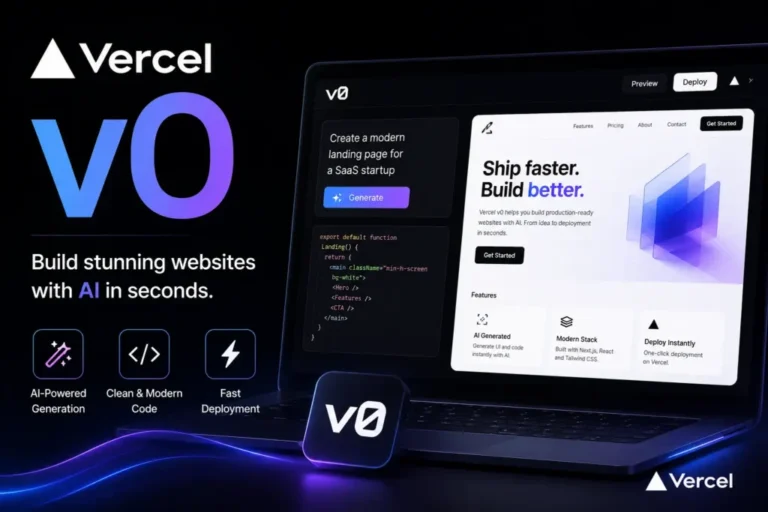
You’ve probably seen the name pop up in developer threads or product demos: “built this with v0.” So what is the v0 app, and can it actually save you work? Short answer: it’s a tool from Vercel, the company behind Next.js, that turns plain-English descriptions into working web interfaces. Here’s what that means in practice.
What the v0 App Actually Is
The v0 app lives at v0.app. You type what you want, such as “a pricing page with three tiers and a monthly/yearly toggle,” and it builds the page for you. You see a live preview, and you can keep refining it by chatting.
It started as a way to generate interface components. It has since grown into a fuller app builder that can work with screenshots, Figma files, and existing code repositories. There’s also an iOS app for building on the go.
The code it produces uses React, Tailwind CSS, and shadcn/ui, all popular choices among front-end developers. That matters because you aren’t locked into a strange format. The output is code a developer can read and edit.
How to Build Your First v0 App
The process is simpler than most people expect.
- Create a Vercel account. You need one to use v0, but the free plan is enough to start.
- Write a specific prompt. Say who the page is for, what sections it needs, and what the tone should be.
- Review the preview. Click through it and note what’s wrong.
- Refine in small steps. Ask for one change at a time, like “make the header sticky” or “swap the blue for a dark green.”
- Deploy or export. One click publishes it to Vercel, or you can push the code to GitHub.
Compare two prompts. “Make me a dashboard” gets you something generic. “Make a sales dashboard for a small online shop with weekly revenue, top five products, and a refund rate card” gets you something you can actually use. Detail is the difference.
What a v0 App Does Well
Speed on first drafts. A layout that might take a designer and developer a day can appear in a few minutes. For client pitches or internal tools, that’s a real advantage.
Clean-looking interfaces. Reviewers regularly point to v0’s visual output as one of its strengths. The defaults look modern without much tuning.
Easy deployment. If you already host on Vercel, going from preview to live site takes very little effort.
Starting from a picture. Upload a screenshot or a design file and ask it to rebuild the layout. This works well for recreating a rough sketch or a competitor’s structure as a starting point.
Where It Falls Short
Don’t expect a finished product on the first try. Complex logic, unusual integrations, and carefully tuned user flows still need human attention.
A few things to watch for:
- Long chats drift. After many rounds of edits, small changes can break earlier work. Save versions often.
- Backend needs are limited. It’s strongest on the front end. Databases, payments, and authentication usually take extra setup.
- It favors one stack. If your team works in Vue or plain PHP, it’s a poor fit.
- Costs add up with heavy use. Credits are consumed with every generation, so vague prompts and endless tweaking get expensive.
What Does the v0 App Cost?
The free plan includes a small monthly credit allowance, around $5 at the time of writing, with daily message limits. Paid plans are billed per user and have changed more than once this year, so check the official pricing page before budgeting. Hosting is separate and runs through Vercel’s own plans.
Credits are the thing to watch. Write clear prompts, make focused edits, and you’ll stretch them much further.
Who Should Use It?
- Developers who want a head start on interface work.
- Founders and product managers who need a clickable prototype before hiring anyone.
- Designers who want to test an idea in a real browser.
- Small teams already running on Next.js and Vercel.
It’s a weaker choice for someone who wants a complete, secure business app with no technical help. You’ll still need someone who can review the code before real customers touch it.
The Takeaway on the v0 App
The v0 app is a fast, polished way to get from idea to working interface. It won’t replace a developer, but it removes much of the slow, repetitive early work. Start with the free plan, write specific prompts, and treat the first result as a draft. Used that way, it earns its place in a modern workflow.